 Plamia
Start with text you have permission to publish.
Choose Animation and paste the narration, up to 250 words. Plamia does not fetch Reddit threads from a URL. Use your own story or material you have permission to adapt.
A useful structure is setup, discovery, confrontation and consequence. Keep the money, timeline and identities consistent so the reveal makes sense.
“I had been paying my roommate $1,200 every month, thinking we split the rent equally.”
In this example, the envelope triggers the discovery. The $1,200 payment and $1,600 total rent give the viewer concrete information to compare.
Build the visual plan without uploaded photos.
This archived production contains 15 generated images based on the script. The generated sequence moves from the envelope and rent payment to a phone call, a rent ledger, and the confrontation. The background ties the 19 timeline scenes together. For a new project, choose a template to establish a coordinated visual treatment.
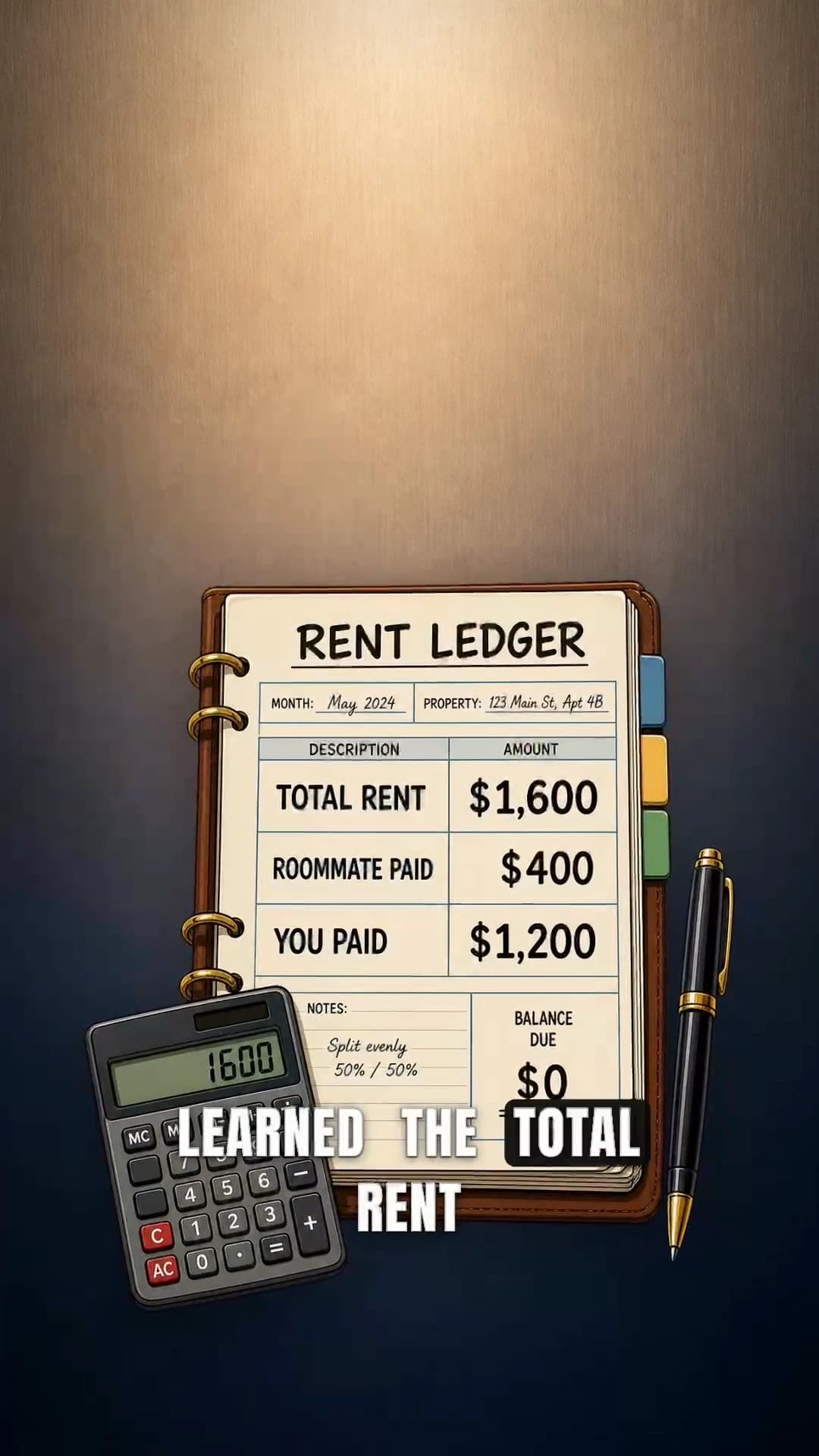
This run used no photo uploads, no gameplay footage, and no custom instructions. It still produced a scene-specific image sequence rather than a generic loop behind the captions.
- 01Establish the renter and the hidden landlord.
- 02Show the $1,200 monthly payment.
- 03Reveal the actual $1,600 total rent.
- 04Turn the management fee into the confrontation.
Keep recurring characters recognizable.
The example returns to the same illustrated renter between story scenes. In the current workflow, add a character photo through the plus button with your script when a particular appearance matters. Plamia interprets the photo automatically; you do not select a separate avatar.
Review the face, clothes and role across scenes. A shared reference helps guide the result but does not guarantee identical features in every generated image.
Choose a template, then voice and pace.
Ink Fable suits an illustrated story; Warm Story gives a softer tone; Comic Rush can emphasize a reveal. Choose from the actual previews rather than treating one style as the best option for every story.
Open the gear to preview a Voice and choose Voice delivery, Pace and Captions. Fast can suit short reactions, while Balanced leaves more time to read a ledger or understand a discovery. Check the credit quote, then click Create video.
Check the quote for your own story.
Current templates use a fixed generation quote based on script length, pace, direction and voiceover. The old cost of this archived example is not a price for a new 132-word video.
Read how video credits are calculated and use the amount shown before generation. Export requires Creator or Pro and uses no additional credits.
Refine the scenes on the timeline.
Generation is the start of the edit. The narration, captions, visual sequence, motion, sound effects, and background remain available on the Plamia timeline, so a weak scene can be corrected without rebuilding the whole video.
- Scenes
- Replace, resize, and reorder visuals
- Timing
- Adjust scene length and placement
- Captions
- Edit words, emphasis, and position
- Finish
- Refine motion, background, and sound
For the full review process, follow the script-to-video workflow.
Review the reveal before export.
- Check that the visuals show the same payment amounts as the narration.
- Use Replace for an incorrect image and Arrange for elements that cover each other.
- Keep captions readable without hiding the ledger or the character’s reaction.
- Distinguish a fictional or adapted story from a factual personal account.
- Watch the finished MP4 after export, including the final sentence.
The opening of the 132-word story.
Six months after I moved into a new apartment, I found an envelope addressed to the actual landlord. I had been paying my roommate $1,200 every month, thinking we split the rent equally. Out of curiosity, I called the number on the envelope and learned the total rent was only $1,600. My roommate had been paying $400 while I covered the rest. When I confronted him, he said the extra money was a “management fee” because he found the apartment first.
Questions about Reddit story videos.
What is an AI Reddit story video generator?
It turns story text into a narrated short video with captions and visuals. Plamia creates a complete video on an editable timeline, so scenes, motion, captions, sound effects, and the background remain available before export.
Can I paste a Reddit link into Plamia?
No. This workflow starts from text you paste into the script composer. Plamia does not fetch or scrape Reddit threads. Use only a story you created or have permission to republish.
Do I need photos or gameplay footage?
No. Plamia can generate illustrated scenes from your script, so you do not need to record footage or find a gameplay loop. You can optionally attach photo references to the script, provided you have permission to use them.
Can I use my own voice for a Reddit story video?
Yes. Record yourself telling the story in a vertical 9:16 video. AI video animation adds scenes based on your speech while keeping your original voice. You can also choose an AI voice when starting from a written script.
Can I edit the generated story video?
Yes. The generated video opens on a multi-track timeline where you can replace or resize images, adjust scene timing and motion, edit captions, move sound effects, and change the background before export.
Start with a story you can make your own.
Paste the text, choose the voice and visual settings, then review every scene before you export.
Get StartedThis example was made with an earlier version of Plamia; its old settings and billing are not the current workflow. The player shows the complete 41.2-second production. This independent example was created in Plamia from original text supplied by the creator. Plamia is not affiliated with or endorsed by Reddit, Inc. Creators are responsible for the rights and permissions needed for any story or media they publish.