

Captions AI Alternative for Talking-Head Videos
Plamia times captions to every word of your recording, draws cutaways from what the speaker says, and leaves every phrase editable. Here is how it compares with Captions.
Caption your videoPlamia’s Smart Captions does three things to a talking-head clip. It times a caption to every word. It can draw cutaways from what the speaker is describing, in one illustration style. And it leaves all of it editable: reword a phrase, restyle a single word, drag a line off a face, move or remove a cutaway. It runs in the browser, with nothing to install.
Captions is the app most creators mean when they search for “captions ai”. Its maker has been called Mirage since September 2025, and the app keeps its name. It is an AI video editor built around the iPhone that applies a whole edit style in one pass. If you work at a desk, want drawn cutaways, or want them without a top-tier plan, Plamia is the alternative to look at.
In brief
- Plamia draws cutaways from the speaker’s own words, in one illustration style, and keeps the original voice running underneath.
- Every caption phrase and every cutaway stays editable after generation, and those edits use no credits.
- Illustrated cutaways need no particular plan in Plamia: they are paid for in credits, sold from $4.50 without a subscription. Captions lists AI Edit and generated B-roll in its Max plan at $24.99 a month.
- Captions remains the better pick for editing on a phone, trimming pauses and translating captions.
When a Captions alternative makes sense
Captions describes itself as “an AI video editor that produces fully-edited videos”. It runs on iOS and on the web, with a lighter Captions Lite app on Android, and its pricing page notes that the listed features and prices reflect the iOS plans.
Sources: Captions home page, Captions is now Mirage, Captions plans
It is a capable app for filming and finishing on a phone. Plamia is the stronger choice in four situations.
- You edit at a computer. Plamia is designed for the browser, with a full-size preview and timeline.
- You want the cutaways drawn, in one style, from what the speaker is describing.
- Your clip is longer than a minute. Smart Captions takes recordings of up to 2 minutes. Captions’ web caption flow takes clips of 4 to 60 seconds.
- You want cutaways without the top plan. They are part of every paid Plamia plan, where Captions puts AI Edit and generated B-roll in Max.
Sources: Adding captions in Captions, Captions subscriptions
Every caption and cutaway stays editable
Transcription gets names and product terms wrong in every tool, so what happens after the first pass matters more than the first pass. In Plamia each caption phrase is text you select on the video itself. Correct a name, change the font, size or color of one phrase while the words around it keep their style, or drag a line away from someone’s face.
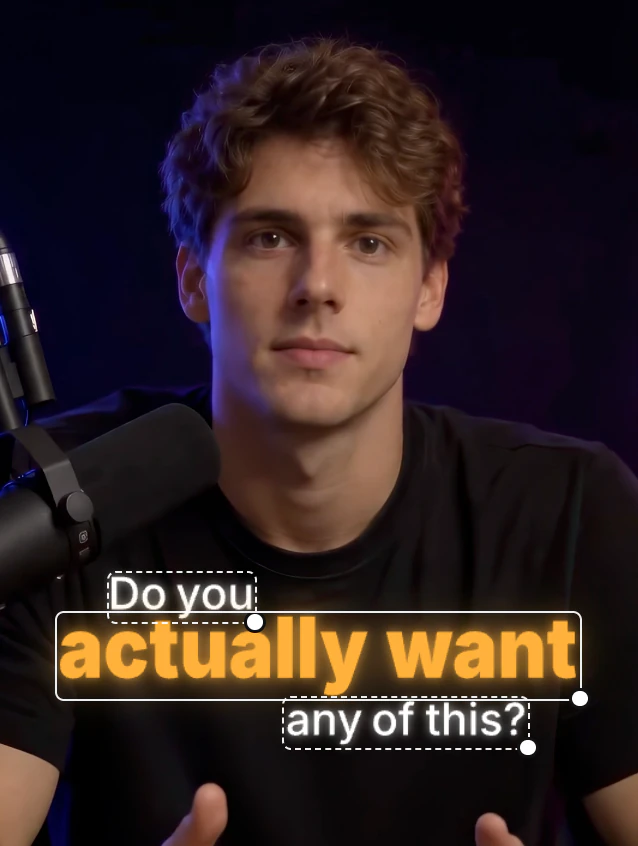
Each illustrated cutaway is a clip on the timeline. Move it earlier so the picture arrives as the speaker starts the story, trim it so the reaction shot comes back sooner, or delete it. None of these edits uses credits, and the recording and its voice are never altered.
Sources: Plamia Smart Captions, How to format captions for short-form video
Plamia and Captions side by side
Scroll horizontally to compare every column.
| Workflow | Plamia | Captions |
|---|---|---|
| What can it add over the speaker? | Illustrated cutaways drawn from the speech, in one style, with the Story template | B-roll, music and transitions applied by an AI Edit style |
| Which plan includes cutaways? | No plan needed: credits from $4.50 | Max, $24.99 a month |
| How are captions styled? | 25 templates. Select any phrase on the video to reword, recolor, resize or move it. No credits used. | More than 100 styles on paid plans and one on Free, with a highlight on the spoken word |
| What can I upload for captions? | A vertical 9:16 video with speech, 3 seconds to 2 minutes, up to 100 MB | In the web caption flow, a 9:16 clip of 4 to 60 seconds, up to 100 MB |
| Where does it run? | In a web browser, with nothing to install | On iOS and the web, with Captions Lite on Android |
| Does it change my recording? | No. The voice and the footage stay as recorded. | It can. AI Trim removes pauses and filler sounds. |
| Can I download a subtitle file? | No. Captions are part of the video. | Yes. An SRT file is an export option. |
Sources: Captions caption styles, Captions AI Trim, Captions export settings, Plamia Smart Captions
Generated B-roll or illustrated cutaways
Plamia treats a cutaway as an illustration of the sentence. A guest describes a conversation in a café, so the picture cuts to a drawing of that café and returns to the guest for the reaction. The voice never stops, and every cutaway in the clip shares one drawn style, so the video reads as one piece.
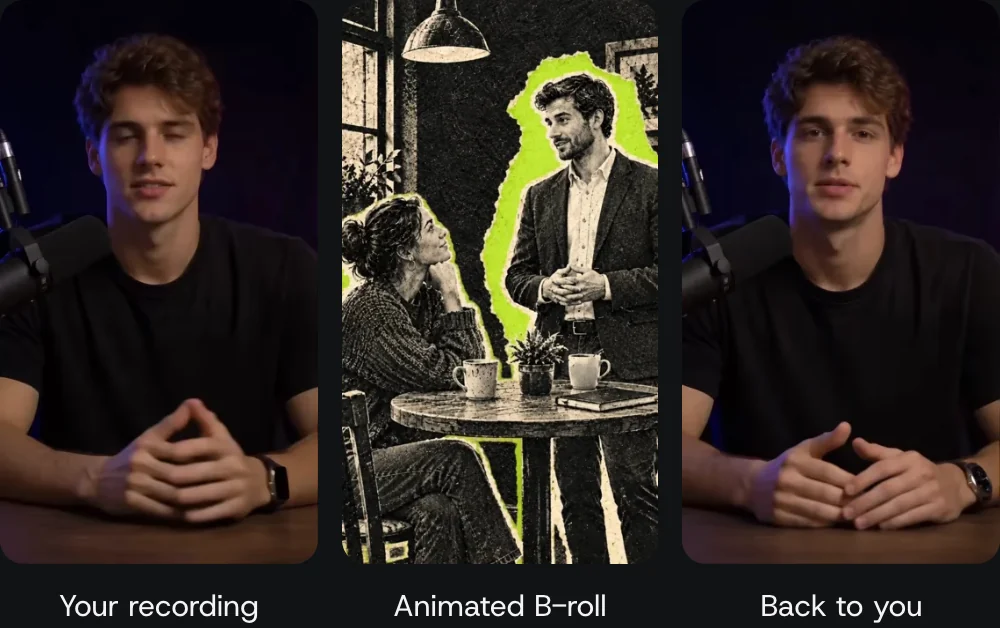
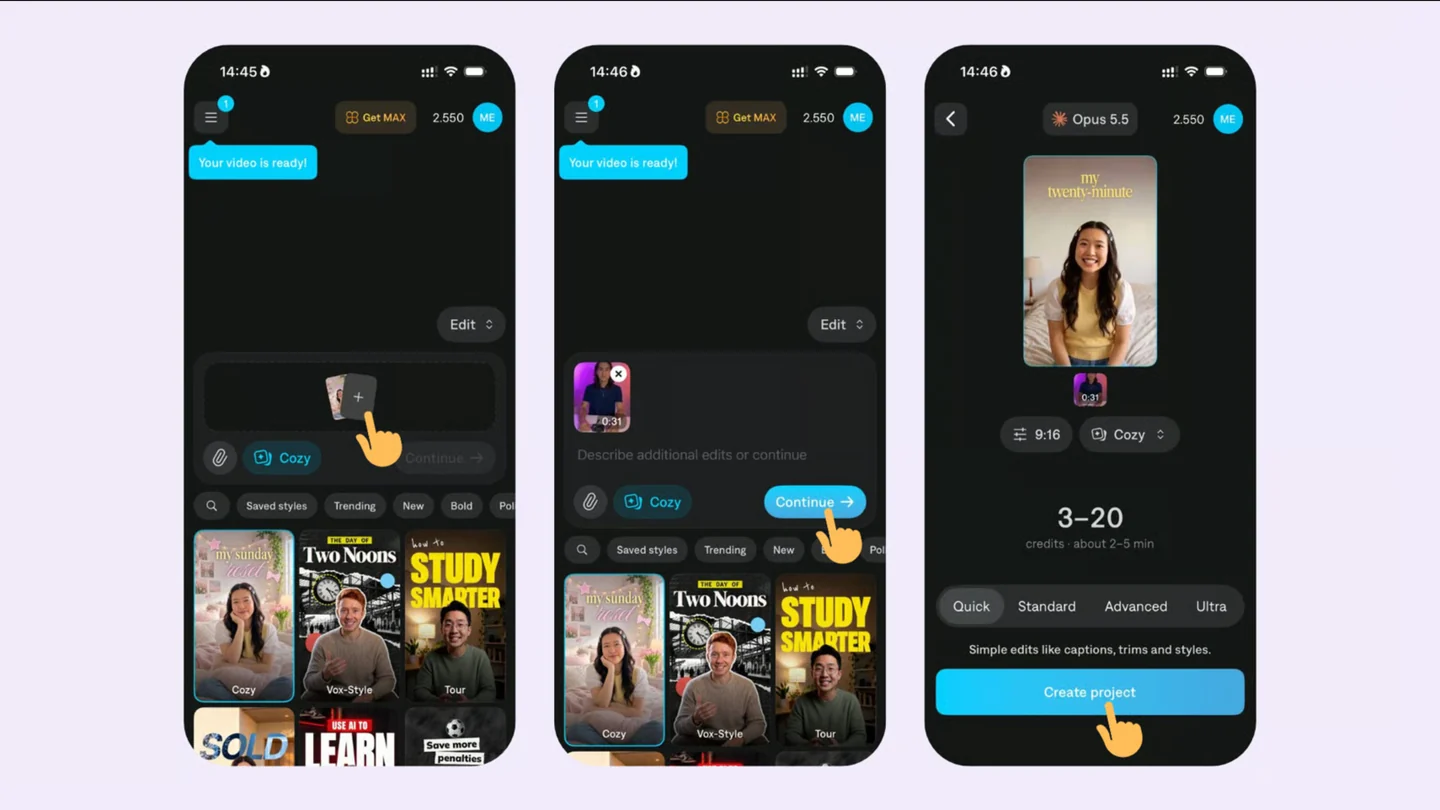
In Captions you choose an AI Edit style and the app applies B-roll, transitions, music and other elements across the recording. You can also type a request, such as a zoom at a certain moment or different B-roll.
Sources: Captions AI Edit
If the recording already shows what matters, such as a product in someone’s hands, skip the cutaways. A text-led Plamia template keeps the original shot on screen and only adds the words.
Captions and Plamia pricing
New Plamia accounts get 300 credits at signup with no payment card. A recording of up to 30 seconds costs 25 credits with a text-led template or 50 with Story, and a clip of up to two minutes costs 50 or 110, so the welcome credits cover several clips. You preview and edit before paying. Downloading the MP4 takes one purchase: credits from $4.50 for 300, or Creator at $24 a month with 2,000. The same credits pay for script animations, GIFs and image motion.
Captions has a free tier with a small lifetime credit allowance, one caption template and no watermark. Its help center lists Basic at $9.99 a month. The pricing page lists Max at $24.99 a month with 500 credits and Frontier at $69.99 a month with 1,400 credits, and says these features and prices reflect the iOS plans. AI Edit, AI Twins and generated B-roll belong to Max, and exporting a Max-only feature on Basic adds a watermark.
Sources: Plamia plans, Captions plans, Captions watermark rules
Captions alone cost $9.99 a month on Captions Basic. In Plamia they are paid per clip, from credits you buy once from $4.50. The gap opens when you want cutaways: Captions puts them in Max at $24.99 a month, and Plamia charges 50 credits for a Story clip of up to 30 seconds.
When Captions is still the right tool
Smart Captions is built for captions and cutaways on short recordings and goes deep on that. Captions covers jobs Plamia does not take on.
- Filming and editing on a phone. Captions is built for iOS, and Plamia has no mobile app.
- Changing the recording itself: trimming pauses, eye contact correction and AI Twins.
- Translated captions and subtitle files. Captions lists translation into more than 100 languages and SRT export.
Sources: Captions subscriptions, Captions introduction
How to try a Captions clip in Plamia
- Take a vertical clip you have already finished in Captions. Use the original recording, between 3 seconds and 2 minutes, up to 100 MB.
- Upload it to Smart Captions. Choose Story if a sentence would be clearer with a picture, or a text-led template to keep the speaker on screen.
- Check the credit estimate, then generate the captions.
- Play it with sound for names and numbers, then muted for readability. Fix or move any phrase that needs it, and adjust the cutaways on the timeline.
- Compare the two versions: which cutaways help, which captions read faster, and what each costs per clip.
Frequently asked questions
What is the best Captions AI alternative for talking-head videos?
For word-timed captions and illustrated cutaways on a short vertical recording, Plamia Smart Captions is a close fit: it draws the cutaways from the speaker’s words, keeps every phrase editable and runs in a browser. For trimming pauses, eye contact correction or editing on a phone, Captions does more.
Can I edit the captions after Plamia generates them?
Yes. Select any phrase on the video to correct it or to change its font, size, color and position, while the other captions keep their style. Cutaways are clips on the timeline that you can move, trim or delete. These edits use no credits.
Is Captions the same company as Mirage?
Yes. The company behind the Captions app renamed itself Mirage in September 2025. The app and its website are still called Captions.
Can I use a Captions alternative on a computer?
Plamia runs in a web browser on a computer, with nothing to install. Captions also has a web app, though its pricing page describes the iOS plans.
Does Plamia change my recording or my voice?
No. Plamia keeps the recording and its voice exactly as uploaded. It adds captions and optional illustrated cutaways on top.