

7 Best AI Animation Generators
Compare seven ways to animate a story, a character, or a single shot. See the editors, what you can change, and what it costs to export.
Animate a scriptA client likes your animation and asks for one change. Can the courier open a blue box instead of a red one? In a character editor, you might swap a prop. In a generated video clip, that same request can cost another take.
We reviewed public creation screens, the makers’ editor walkthroughs, and US pricing. Here’s what each tool lets you change after the first draft.
Which animation tool fits your project?
- PlamiaWe build this
Animate a script, then retime a character without redrawing the background or rerecording the voice.
- Vyond Go
Stage a training conversation and revise either speaker’s lines later.
- Animaker AI
Build a cartoon around poses, expressions, and timed character actions.
- Runway
Generate a custom shot when a stock character action won’t fit.
- LTX Studio
Storyboard a film shot by shot and hand the cut to an editor.
- Renderforest
Put together a branded explainer from scenes with editable text and media.
- Canva
Animate the headline or product photo in a design you already have.
1. Plamia for narrated illustrated shorts
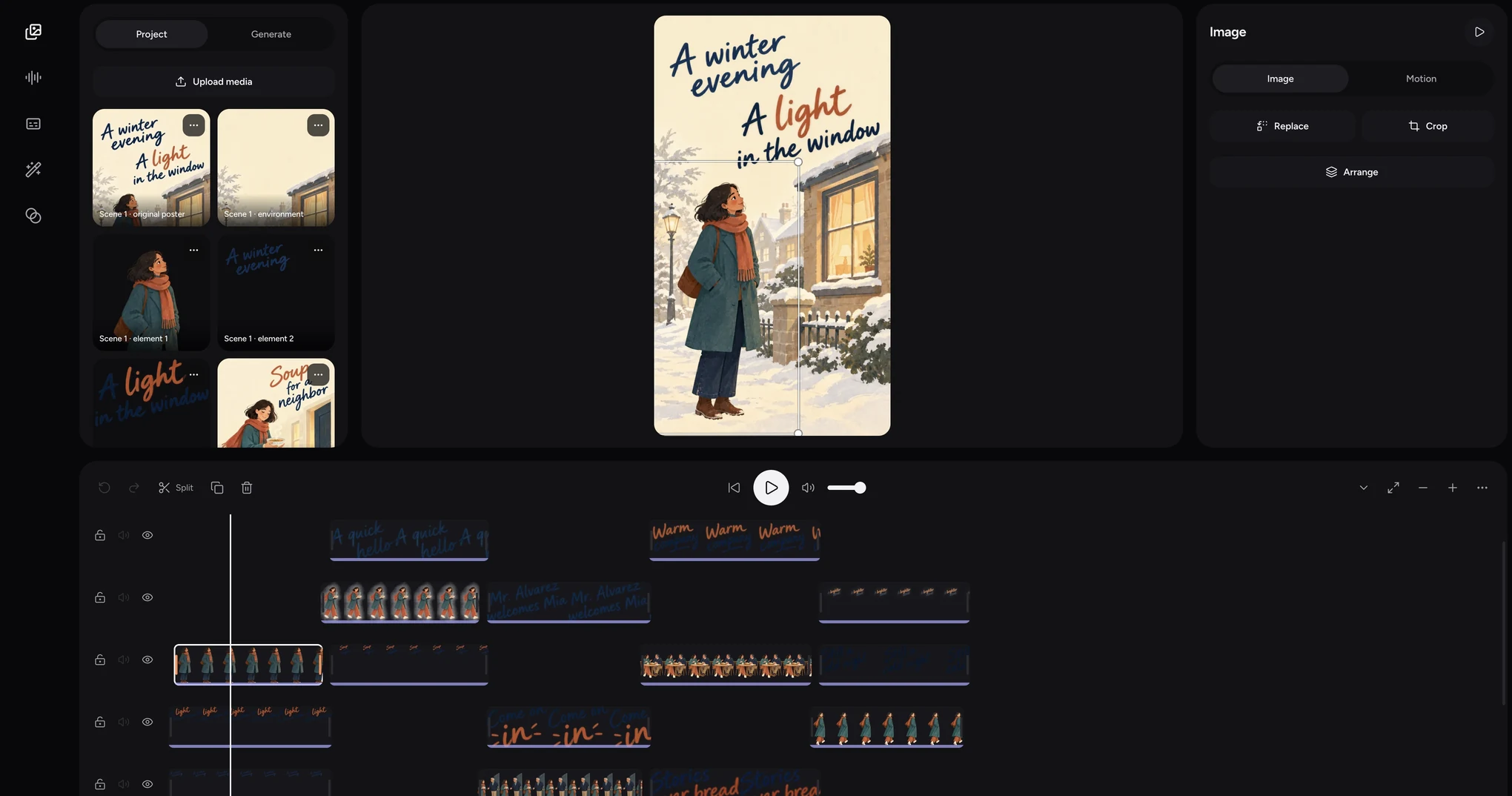
Plamia turns a script into a narrated animation you can take apart. The person, the street behind her and the caption can each have their own layer. That matters when a client likes the scene but wants the character to enter on a particular word.
In the winter scene below, drag the woman’s clip a second later and the snowy street stays visible while the narration continues. You can reuse the same background for a second cut. Moving or reusing an existing image costs no credits. Generating a different illustration does.
Preview the animation on Free. To download it, buy credits once, from $4.50 for 300, or subscribe to Creator at $24 a month with 2,000 credits. Either way MP4 exports are unlimited. If a client comes back for a timing change, reopen the saved project and export the revised cut without spending credits again.
Sources: Script to Animation, Plamia plans and export limits
2. Vyond Go for training videos and dialogue
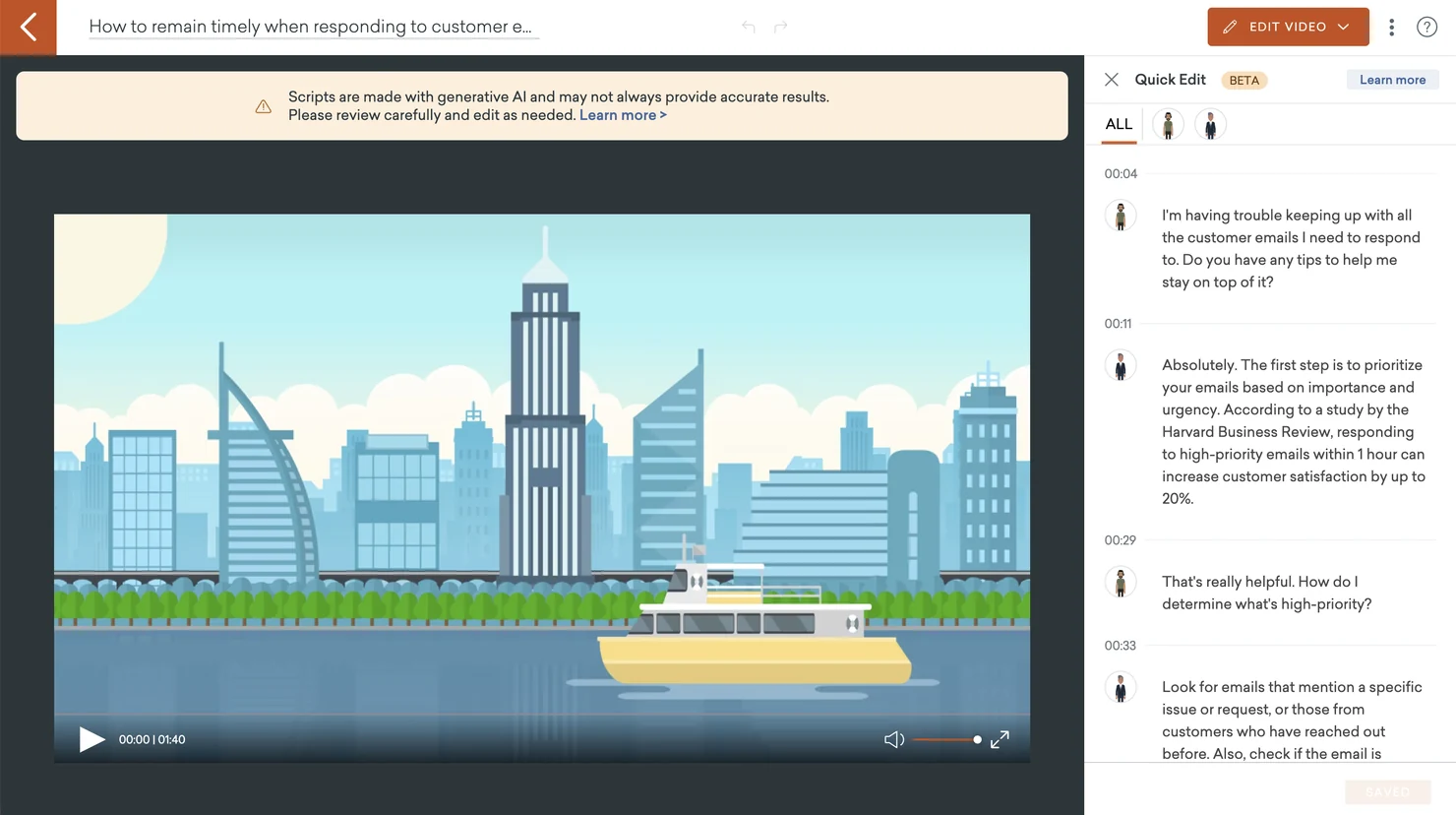
Vyond is a good pick for an onboarding scene you’ll update every quarter. Give Go a script and choose a conversation layout. When a policy changes, Quick Edit lets you rewrite the relevant line or swap the speaker. Open the same draft in Vyond Studio to change the setting, props, or timing.
Go’s conversation layout supports two speakers and ignores visual directions added to their dialogue. If “the courier opens the parcel” needs to happen on a particular word, stage the action in Studio.
Starter costs $99 for one month or $699 for a year. The free trial lets you preview a watermarked video. Downloading a clean 1080p MP4 requires a subscription. That’s a steep one-month price for a single cartoon, and easier to justify for a library of training scenes.
Sources: Vyond Go and Quick Edit, Vyond pricing, Free trial download limits, Download and watermark rules
3. Animaker AI for 2D character cartoons
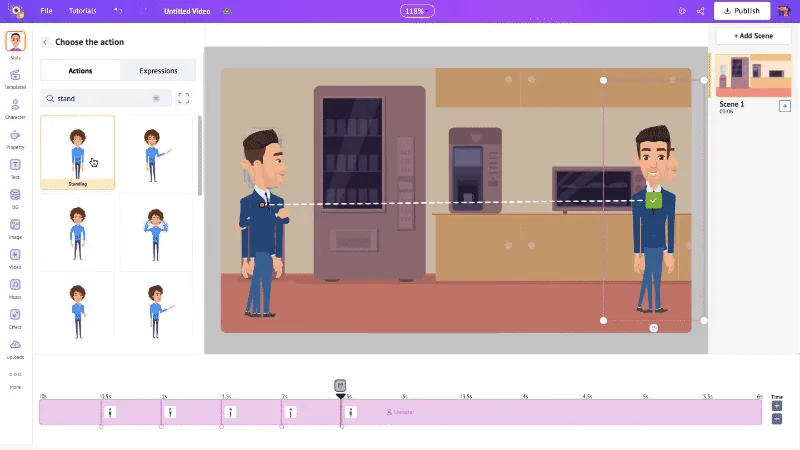
Animaker is useful when the joke depends on a character’s timing. You can start from an AI draft, select a character, and give it a sequence of actions. Have the courier walk in, stop, and wave. With Action Plus you can adjust the sequence without redrawing the background.
The action library sets the limits. For a particular hand movement, check that the pose exists before building the scene. You can reuse the cast and adjust the props when you make the next episode.
Starter costs $45 billed monthly or $300 for a year. It includes Full HD video and ten premium downloads per month. Animaker lists commercial rights under Pro, so check that tier if you’re making the cartoon for a client.
Sources: Animaker’s 2D animation walkthrough, Animaker AI editing options, Animaker plans and download allowances
4. Runway for a shot you can’t build from presets
A paper bird unfolding itself and flying out of the box is a good reason to try Runway. Give Gen-4.5 a drawing as the first frame and describe the motion, or start from text. A generation runs from two to ten seconds. Download the take you like and cut it into your film.
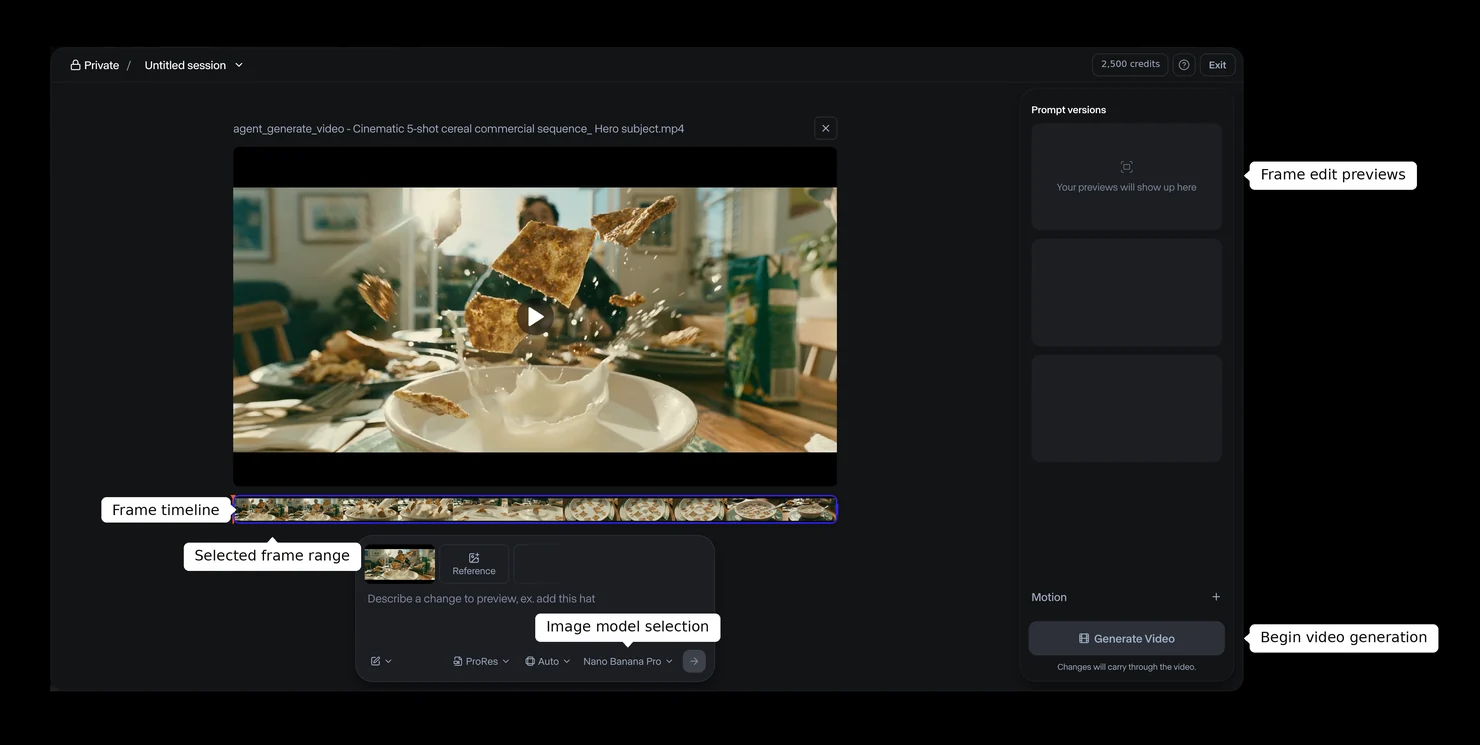
The exported clip arrives as one piece of footage. The bird and the box have no separate handles. In Edit Studio, select the frame range, provide a visual reference if needed, and ask for a change. A successful take can save the shot. Another attempt uses more credits.
Standard is $15 billed monthly or $12 per month billed annually. Its 625 monthly credits cover about 52 seconds of Gen-4.5 generation. Four takes of a five-second shot use roughly 20 of those seconds, even if only one makes the cut. Standard removes the watermark.
Sources: Gen-4.5 inputs and duration, Runway Edit Studio, Generate Speech, Runway credit allowances
5. LTX Studio for storyboards and multi-shot films
Choose LTX Studio if you need a wide shot of the delivery, a close-up of the parcel, and a reaction from the same courier. Turn the script into a storyboard, save the courier as a reusable Element, and reference that character in each shot. You can revise a single take before sending the sequence to the timeline.
It’s also the pick here for handing a cut to another editor. Send an MP4 for review, or export an editing package with XML and media for Premiere Pro or DaVinci Resolve. The cuts remain editable. The characters inside each clip are part of the footage.
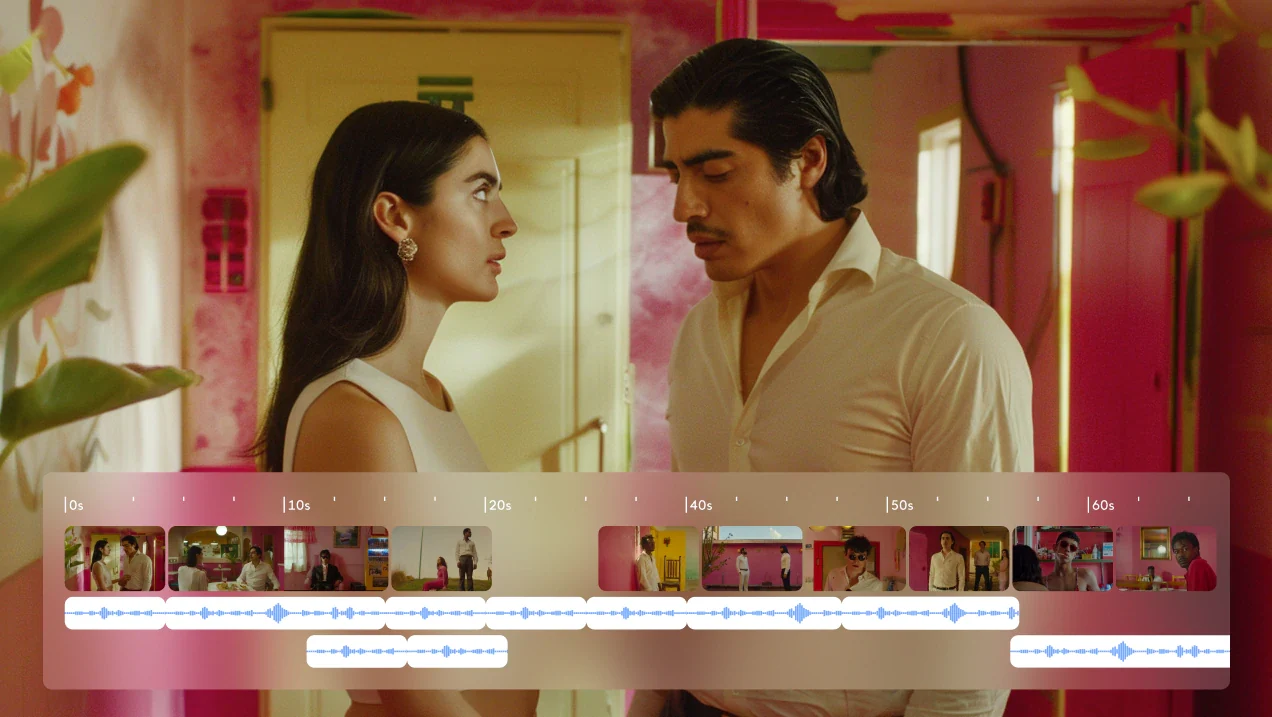
Lite is $15 billed monthly and removes the watermark, but its license is for personal use. For client work, Standard is $35 billed monthly or $336 for a year. That tier also includes AI storyboards and saved Elements.
Sources: LTX Studio shot editor, LTX timeline and export guide, LTX voiceover tools, LTX Studio plans and licenses
6. Renderforest for a quick branded explainer
Renderforest works well for a short product announcement. Start with a script or a template. Replace the media, edit the scene text, and set the voiceover and music. If only the opening needs an original animated shot, you can generate that scene and keep the rest of the explainer.
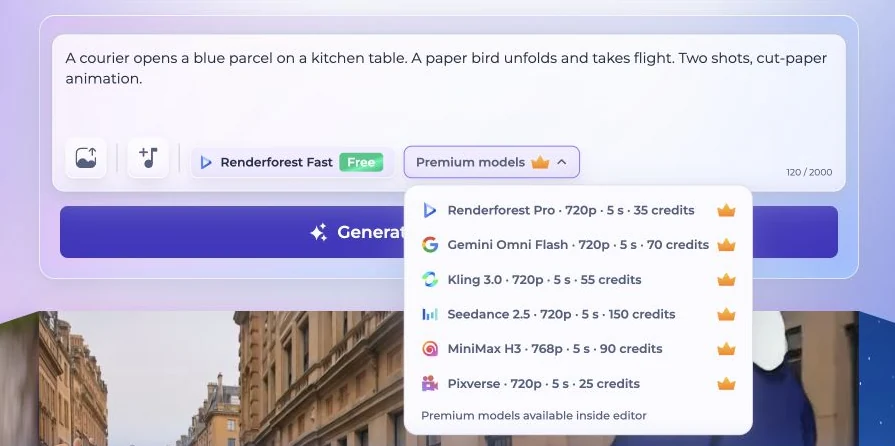
The free AI download is 480p with a watermark. The generator lists Lite at $15 billed monthly, with watermark-free 720p or 1080p AI downloads. Template exports have their own resolution limits.
Sources: Renderforest composer and AI export comparison, Renderforest subscription plans
7. Canva for animated posts and slides
If the artwork is already finished, Canva is often the quickest way to put it in motion. Select a headline, photo, or illustration and animate it on the page. A shop can keep the logo fixed, bring in the product photo, and change the price next week by editing the same text box.
Magic Animate, included with Canva Pro, suggests a motion style for the whole design. Individual elements stay selectable in the Canva file. This suits a poster or a launch slide. Apply the same effect to a photograph of the courier and the entire photo moves. Making the courier’s hands open the box calls for a tool like Runway.
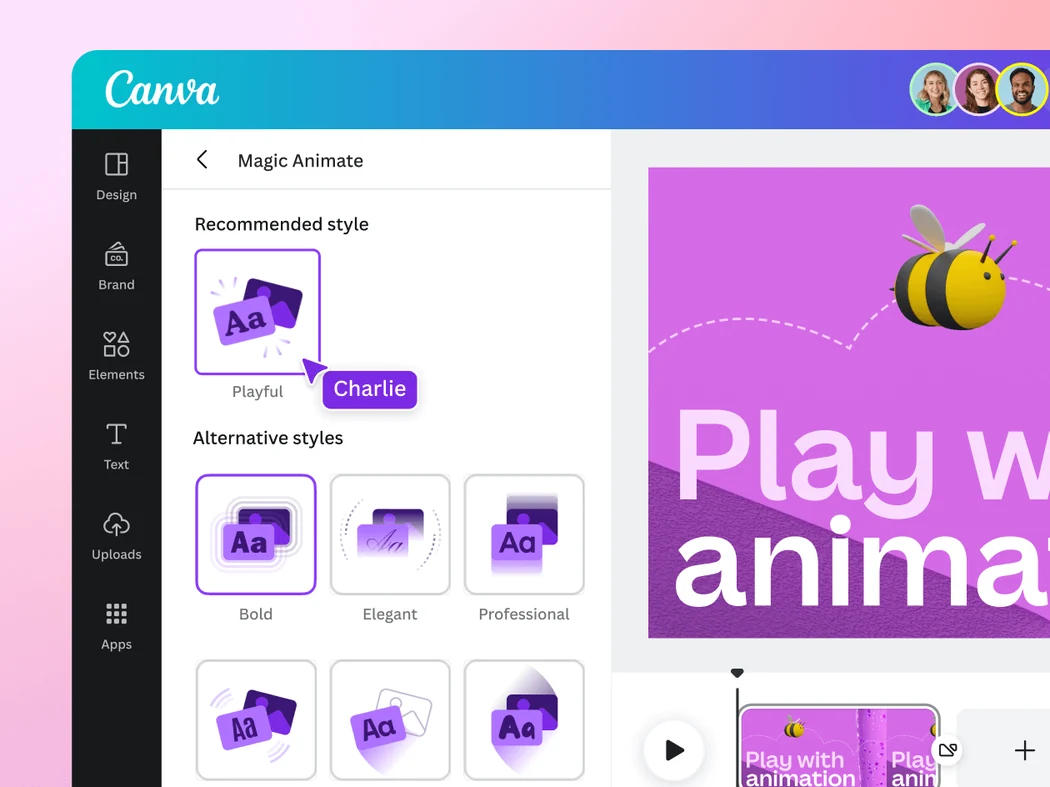
Canva Free can export a design made with your own or free assets as an MP4 or GIF. Premium library items need a license for a clean download. Keep an editable design link if someone else will be updating prices, dates, or brand colors.
Sources: Canva Magic Animate, Canva AI Voice, Free and Pro asset licenses, MP4 and GIF download options
Animation features compared
The answers cover the workflows shown above, including Gen-4.5 for a generated Runway shot and Magic Animate for a Canva design. A character baked into a video clip behaves differently from one placed on its own layer.
| Feature | Plamia | |
|---|---|---|
| Can one script or brief produce several scenes? | Yes | Yes |
| Can I move a character without regenerating the shot? | Yes, on its own layer | Yes, in Vyond Studio |
| How do I direct movement? | Move and time each illustrated layer | Assign character actions or draw motion paths |
| Can it generate spoken narration? | Yes | Yes |
| Can I download a watermark-free MP4 on a free plan? | No | No |
What would you need to change tomorrow?
Before paying for a year, try the revision your own project is likely to need. Rewrite a line of dialogue, delay a caption, or ask for a second take. Open the downloaded file and the saved project. Which one would you want back when the client calls?
Frequently asked questions
Can I edit the characters after downloading an MP4?
An MP4 combines the visible layers into each frame. Keep the original project to move a character, change a caption, or replace an illustration. In a video editor you can still trim the MP4 and add new layers over it.
Which tool works best for two characters talking?
Vyond Go lets you draft a two-speaker conversation and change either line in Quick Edit. If the timing of a gesture matters more than the dialogue, Animaker’s Action Plus gives you a sequence of poses to adjust.
Can I finish the animation in Premiere Pro or DaVinci Resolve?
LTX Studio can export an XML editing package with the media. Open that package to keep the shot sequence and adjust the cuts. Ask for it when someone hands over the project, alongside the MP4 you use for review.
How can I try an animation tool before paying?
Use a ten-second scene from your own project. Change one line, move one visual, and try downloading the result. Check the resolution and watermark on that file, and look up commercial-use rights if you’re making it for a client.